AI TOOL / #08846
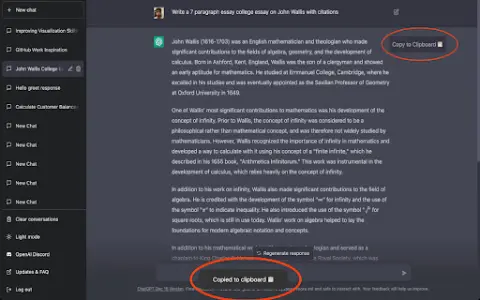
Copy for Chat GPT
An extension used to copy ChatGPT responses and check for plagiarism.
Introduction
Extension to copy ChatGPT responses and check for plagiarism.
What is the Plagiarism Detector Extension for Chrome – an extension/plug-in for Google Chrome?
This extension allows you to copy the responses generated by ChatGPT by clicking a button or using the CMD+K shortcut key, and then have those responses checked by plagiarism detection tools.
How to use the Plagiarism Detector Extension for Chrome?
You can use this extension by clicking the copy button on ChatGPT’s response or by pressing CMD+K. The copied text will be automatically checked to determine whether it contains any plagiarized content.
The core functionality of the Plagiarism Detector Extension for Chrome.
One-click to copy the response from ChatGPT
Use the CMD+K shortcut key to copy.
Automatic plagiarism detection
Related
MakeSong
AI-generated songs and music videos
Blume Sidecar
Desktop tool for monitoring AI coding agents
AI-based text watermark removal (PixPix)
Zero-width character detection and removal
Er Gou PPT
Chinese-style AI PPT tools for the workplace
Public account typesetting module extraction (PixPix)
Typesetting module reuse
Converting HEIC files to JPG format (using PixPix)
Batch conversion of Apple Photos