AI TOOL / #07222
ReadImage
Extract, edit, and copy text from images on web pages.
Introduction
Extracts, edits, and copies text from images on web pages.
What is Image Text Extractor ai chrome extension/plugin?
This extension allows users to extract text from images displayed on web pages. It supports common image formats such as jpg, jpeg, png and bmp. After extraction, the text can be edited and copied.
How to use Image Text Extractor ai chrome extension/plugin?
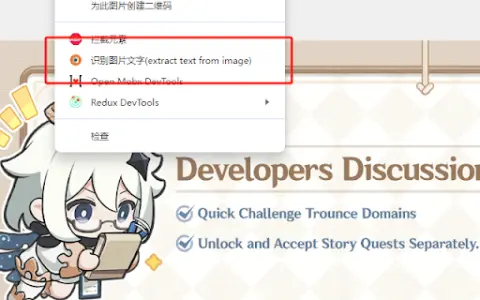
Hover your mouse over the image, right-click and select "Extract text from image". Press "Ctrl + Q" to view the extracted text on the extension page, where it can be edited and copied.
Image Text Extractor ai chrome extension/plugin core features
Extract text from images on web pages
Edit extracted text
Copy extracted text
Related
Viqal
The artificial intelligence-based virtual concierge service uses WhatsApp to automatically respond to messages from hotel guests, thereby enhancing the quality of customer service.
Botsify
Botsify is a chatbot platform that offers white-label solutions and AI-driven automation capabilities.
DenserBot
DenserAI is an AI chatbot solution that transforms websites and files into intelligent dialogue agents.
botsplash.com
An integrated customer interaction platform that offers multi-channel communication capabilities and tools for converting potential customers into actual clients.
ChatWise
Desktop AI chatbots that support a variety of LLMs, with data stored locally.
Chatling
A code-free AI chatbot platform designed to automate customer support and generate leads.