AI TOOL / #07177
Chrome Virtual Camera
Use the clock, video file, and background masking options in place of getUserMedia().
Introduction
Replaces getUserMedia() with clock, video file, and background masking options.
What is the getUserMedia() Replacement AI Chrome extension/plug-in?
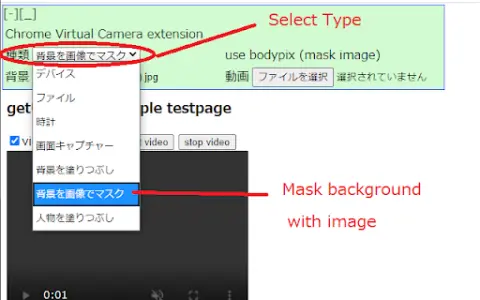
This tool replaces the standard getUserMedia() function, enabling the use of clocks, video files, as well as the tfjs/body-pix technology as background masks for video sources.
How to use the getUserMedia() Replacement AI Chrome extension/plug-in?
This tool intercepts calls to the getUserMedia() function and provides alternative video sources, such as clocks, video files, or video streams with masks using tfjs/body-pix. The specific implementation and configuration details depend on the particular library or technology being used.
The core functionality of the getUserMedia() replacement AI Chrome extension/plug-in
Replace the getUserMedia() function
Provide a clock as the video source.
Provide a video file as the source material for the video.
Implement background masking using tfjs/body-pix.
Related
Sonix AI
A platform for automatic transcription, translation, and subtitle generation of audio/video content.
Image to Prompt Pro
A free AI tool that generates detailed prompts from images, suitable for AI art and SEO.
UniScribe
UniScribe is an artificial intelligence-based platform for audio and video transcription, summary generation, and mind map creation.
FakeYou
AI voice generators are used to create audio and video content featuring the voices of celebrities and fictional characters.
HTTPie AI
A user-friendly command-line HTTP client designed for API testing and interaction.
Fliki
An AI platform that uses text to generate videos, offering authentic voices and media content.