AI TOOL / #06524
Speak based on Azure Speech
Text-to-speech extension using Azure Speech with support for multiple languages and Chrome live subtitles.
Introduction
Text-to-speech extension using Azure Speech, supports many languages and Chrome Live Caption.
What is Azure Speech TTS Extension ai chrome extension/plugin?
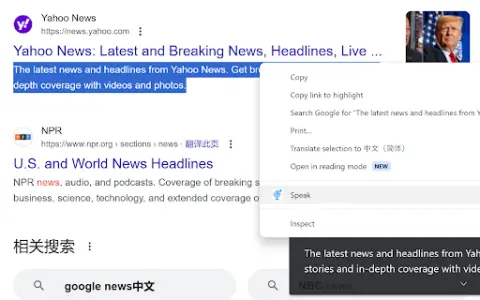
This is a text-to-speech (TTS) extension that leverages the Azure Speech service to convert selected text to audio. It supports multiple languages and integrates with Chrome's Live Subtitles feature for enhanced accessibility. Users need to configure the extension using their Azure Speech Service API key to enable TTS functionality.
How to use Azure Speech TTS Extension ai chrome extension/plugin?
Install the extension, configure it with your Azure Speech Service API key, select text on a web page, and use the extension to play audio for the selected text. Audio playback will be based on the selected language and voice settings.
Core features of Azure Speech TTS Extension ai chrome extension/plugin
Text-to-speech using Azure Speech Service
Support multiple languages
Integrate with Chrome Live Subtitles
Configurable voice settings
Related
ApolloAI
Generative AI platforms designed for content creation: music, audio, dubbing, images, videos, and text.
Mediscribe Pro
Artificial intelligence-based medical record and documentation tools for healthcare professionals.
Konch
Konch utilizes artificial intelligence and human expertise to simplify transcription and translation services.
Transcript LOL
Quickly and accurately convert audio/video content into text, summaries, and insights.
SoundType AI
An AI-powered audio and video transcription service that offers summary generation and collaboration features.
Dictate4Me
Real-time audio transcription applications enable the rapid conversion of speech into text offline.