AI TOOL / #06228
Two Way Voice for Bing AI
Bing AI's voice interaction capabilities enable support for voice-based questions and answers.
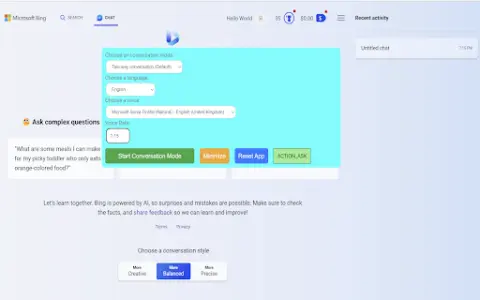
Introduction
Voice interaction extension for Bing AI, enabling voice-based questions and responses.
What is the Bing AI Voice Extension, an Chrome extension/plugin?
This extension enhances the Bing AI website by enabling voice interaction. Users can pose questions verbally and receive answers in either audio or text format. It offers the convenience of hands-free operation and supports multiple languages, including Nepali, Chinese, and Korean.
How to use the Bing AI Voice Extension for Chrome?
Enable the dialogue mode within the Bing AI website. This extension manages the sequence of questions and answers between you and Bing AI. You can choose from three modes: two-way audio communication, text input for voice responses, or text input for audio replies.
The core functionality of the Bing AI Voice Extension for Chrome.
Voice-based questions and answers
Multiple dialogue modes
Multi-language support (Nepali, Chinese, Korean)
Automatic round-robin scheduling
Related
Sonix AI
A platform for automatic transcription, translation, and subtitle generation of audio/video content.
Image to Prompt Pro
A free AI tool that generates detailed prompts from images, suitable for AI art and SEO.
UniScribe
UniScribe is an artificial intelligence-based platform for audio and video transcription, summary generation, and mind map creation.
FakeYou
AI voice generators are used to create audio and video content featuring the voices of celebrities and fictional characters.
HTTPie AI
A user-friendly command-line HTTP client designed for API testing and interaction.
Fliki
An AI platform that uses text to generate videos, offering authentic voices and media content.