AI TOOL / #05993
ChatGPT – Lets talk
A Chrome extension that adds voice control and text-to-speech functionality to ChatGPT.
Introduction
Chrome extension adding voice control and text-to-speech to ChatGPT.
What is the ChatGPT – Lets talk AI Chrome extension/plug-in?
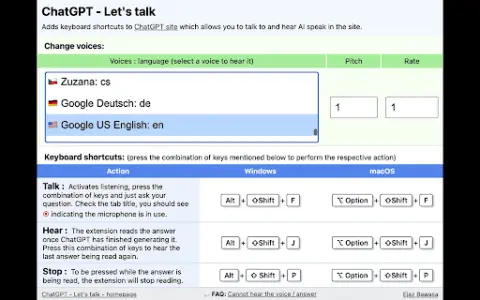
ChatGPT – Voice Interaction is a Chrome extension that adds voice capabilities to ChatGPT. It allows users to interact with ChatGPT using voice commands and enables the AI to read out its responses. This extension has been updated to include new features that allow users to change the AI’s voice, pitch, and speaking speed.
How to use the ChatGPT – Lets talk AI Chrome extension/plug-in?
To ask a question using the microphone, press Alt+Shift+F on Windows or Option+Shift+F on Mac.
2. Listen to ChatGPT repeating its last response, and then press Alt+Shift+J (on Windows) or Option+Shift+J (on Mac).
3. To stop reading aloud, press Alt+Shift+P on Windows or Option+Shift+P on Mac.
The core functions of the ChatGPT – Lets talk AI Chrome extension.
Voice-input questions and ChatGPT
The text-to-speech function is used for the responses provided by ChatGPT.
Customizable voice options (over 100 different voices available)
Adjustable voice tone and speaking speed
Convenient keyboard shortcut controls
Related
New Godwit
Open-source AI-based native email client
New Command Code
Programming Agent specially polished for open source models
New AI Web Maker
Describing your business is essentially the same as creating a corporate website.
New RFPG
UK Property Scanning and Renovation Appraisal
New Confetti
Using chat to create small hardware inventions
The new Trellis
Open-source, native macOS developer terminal workspace