AI TOOL / #04214
Spot AI
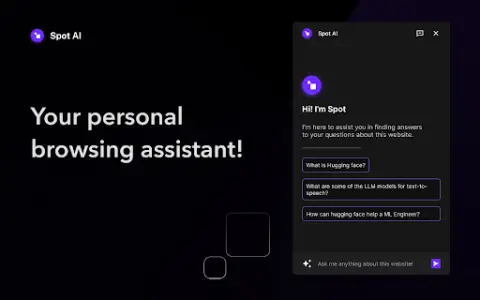
Spot AI reads web pages to answer your questions.
Introduction
Spot AI reads webpages to answer your questions.
What is the Spot AI Chrome extension/plug-in?
Spot AI is a browsing assistant that can read web content and answer questions based on that information. It enables users to easily conduct research and obtain information. It is available as an extension for Chrome and is also compatible with Brave and Arc browsers. Once installed, it can be activated by using the CMD/CTRL + K shortcut key.
How to use the Spot AI Chrome extension/plug-in?
Install the Spot AI extension in Chrome, Brave, or Arc. After installation, activate it by using CMD/CTRL + K. For the best experience, fix the extension in your browser. Then, pose your question, and Spot AI will read the relevant text on the web page to provide you with an answer.
The core functions of the Spot AI Chrome extension/plug-in
Read a web page and answer questions based on its content.
Compatible with Chrome, Brave, and Arc browsers.
Launch it by pressing CMD/CTRL + K.
Related
tangent.ai
An AI customer engagement platform that offers personalized experiences for beauty brands.
StorageIQ
An artificial intelligence-powered home inventory assistant designed to help organize and manage items.
Aquin
Aquin Lucid is an AI-driven browser focused on productivity and ease of use.
prg.ai
prg.ai: Transforming Prague into the European center for artificial intelligence through innovation and collaboration.
Zeli
Zeli provides summaries of articles from Hacker News and HuggingFace, offering concise summaries to help users quickly locate content that interests them.
Koffy
An encrypted news aggregator that provides AI-powered summaries and market analyses.