AI TOOL / #04208
Shift-Ctrl-F: Semantic Search for the Browser
A Chrome extension that uses MobileBERT to search for and highlight answers on web pages.
Introduction
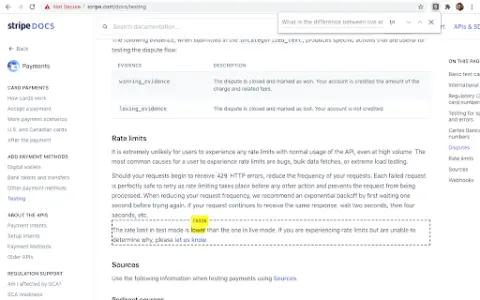
Chrome extension using MobileBERT to search and highlight answers on webpages.
What is the Shift-Ctrl-F Chrome extension/plugin?
Shift-Ctrl-F is a Chrome extension that utilizes the MobileBERT model, which has been fine-tuned using the SQuAD dataset. This extension uses TensorFlowJS to search for answers on web pages and identify relevant elements. It allows users to enter natural-language queries and find corresponding answers within the content of the current page.
How to use the Shift-Ctrl-F Chrome extension/plugin?
1) Open the extension pop-up window using the toolbar or shortcut key (Shift-Ctrl-F).
2) Enter your natural language query in the search box.
3) Press Enter and wait for the model to return the results.
The core functionality of the Shift-Ctrl-F Chrome extension/plug-in.
Conduct natural language question-and-answer interactions on web pages.
Highlight relevant elements based on the search query.
Efficient processing using MobileBERT
Related
Space Make
By utilizing AI-driven content generation and promotion techniques, Twitter Spaces can be transformed into a platform similar to podcasts.
Soca AI
Conversational AI agent platform for smart chat and voice automation.
Panda Video
A video hosting platform that enhances security and incorporates AI capabilities, ideal for digital sales.
Speechlab
AI-based services used for generating transcriptions, translations, and dubbing that preserves the original audio quality.
Audyo
Audio enables the creation of high-quality audio files by simply performing text editing and selecting appropriate voices.
Santas Voice Message
Create personalized Christmas Santa voice messages – this feature is also available for the Wish Fund UK initiative.