AI TOOL / #04050
AI Roundtable
Ask a question and receive answers from multiple AI assistants.
Introduction
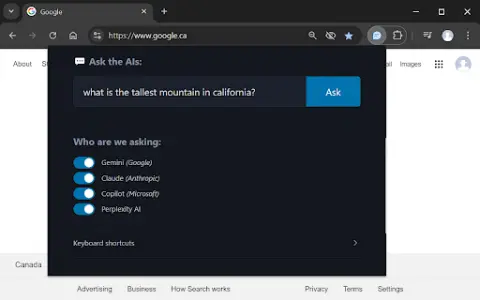
Ask one question, get answers from multiple AI assistants.
What is a Multiple AI Assistants Chrome extension/plug-in?
This website allows users to submit questions at once and receive answers from multiple AI assistants. Users can customize which assistant they want to use for their queries. The website also provides keyboard shortcuts, making it easy to access various functions quickly.
How to use the Multiple AI Assistants Chrome extension?
Use the shortcut keys Ctrl/Cmd + Shift + Q to open the query window and start typing your question. Use Alt + 1 to switch to Gemini, Alt + 2 to switch to Claude, Alt + 3 to switch to Copilot, and Alt + 4 to switch to ChatGPT.
The core functions of various AI Assistant extensions/plugins for Chrome.
Query multiple AI assistants simultaneously
It is possible to customize the selection of AI assistants.
Convenient and fast keyboard shortcuts
Related
Audioburst Search
Audioburst: Search for radio programs and podcasts, and access over 130 playlists.
BloomNote
An AI-powered learning tool that generates notes, flashcards, quizzes, and podcasts from various learning materials.
FCZP
AI-powered podcast app that delivers personalized news and trends.
Narrativ
A news application that converts written articles into readable audio files suitable for streaming.
Podverse
Podverse enhances podcasts with AI: providing transcription services, summaries, and intelligent chat functionality.
Podurama
A free podcast app that offers natural language search and cross-platform synchronization features.