AI TOOL / #02395
PBI Pilot – Seu assistente de Power BI
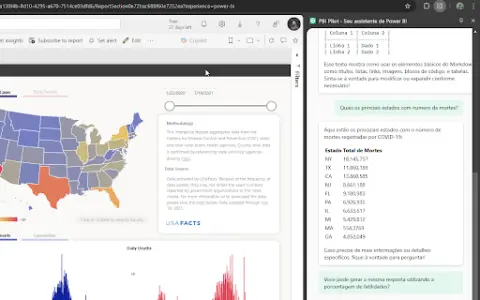
Power BI utilizes generative artificial intelligence to enable real-time data interaction, queries, and chart generation.
Introduction
Power BI uses Generative AI for real-time data interaction, queries, and chart generation.
What is the Power BI AI Chrome extension/plug-in?
Power BI leverages the powerful capabilities of generative artificial intelligence to enhance data interaction. It enables users to perform real-time queries, engage in dialogue with data, generate charts, and carry out various other tasks.
How to use the Power BI AI Chrome extension/plug-in?
Use Power BI to connect to data sources, and then leverage AI-driven features to pose questions in natural language, generate visualizations, and extract insights from the data.
The core features of the Power BI AI Chrome extension/plug-in
Artificial intelligence-driven data querying and analysis
Real-time data interaction
Automated chart and visualization generation
Related
AI Coffee Club
An integrated AI content generation platform that offers tools for text, images, code, chat, and voice processing.
Ahoy for Chrome – Voice composer for Gmail
It allows sending emails via voice, and includes real-time transcription and recording features.
Prompt Speak
AI-driven applications are used to create and enhance written communications, as well as to automate social media management.
Sanchay.ai
Use AI for automated video content processing.
AI Chat Voice Input
Send the transcribed audio to the extensions of Claude.ai and Perplexity.ai.
ApolloAI
Generative AI platforms designed for content creation: music, audio, dubbing, images, videos, and text.