AI TOOL / #01774
Maken similarity service
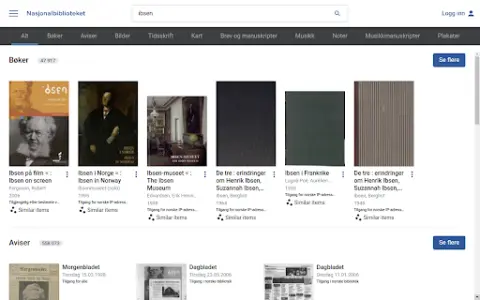
A browser extension that integrates the Maken similarity service into the National Library of Norway website.
Introduction
Browser extension integrating Maken similarity service into the National Library of Norways website.
What is the Maken Similarity Service Browser Extension AI Chrome extension/plugin?
This browser extension enhances search on the Norwegian National Library (nb.no) by integrating the Maken similarity service. It adds a “Similar items” button next to each result in the Books and Images categories. Clicking this button opens a section at the bottom of the screen showing similar items and providing links to further explore related items. This is a new discovery tool developed by the Norwegian National Library’s AI Lab, with all functionality implemented within the main library website.
How do I use the Maken Similarity Service Browser Extension AI Chrome extension/plugin?
After installing the extension, navigate to the book or image search results on nb.no. A “Similar items” button will appear next to each result. Clicking this button will show similar items at the bottom of the screen.
Core features of the Maken Similarity Service Browser Extension AI Chrome extension/plugin
Add a "Similar items" button to nb.no search results.
Display similar items in the section at the bottom of the screen.
Provide links to the relevant projects for further review.
Related
Yogurt
Open-source, free local AI-based meeting recording solution
Canyon Code
Observation and Governance Platform for Enterprise AI Workflows
Changpei Literature
Original literature and female-oriented reading platform
Wikisource
Wikimedia Digital Library
Literary Hub
Literary Culture and Publishing Information Website
Wattpad
A global community for creating and reading original stories